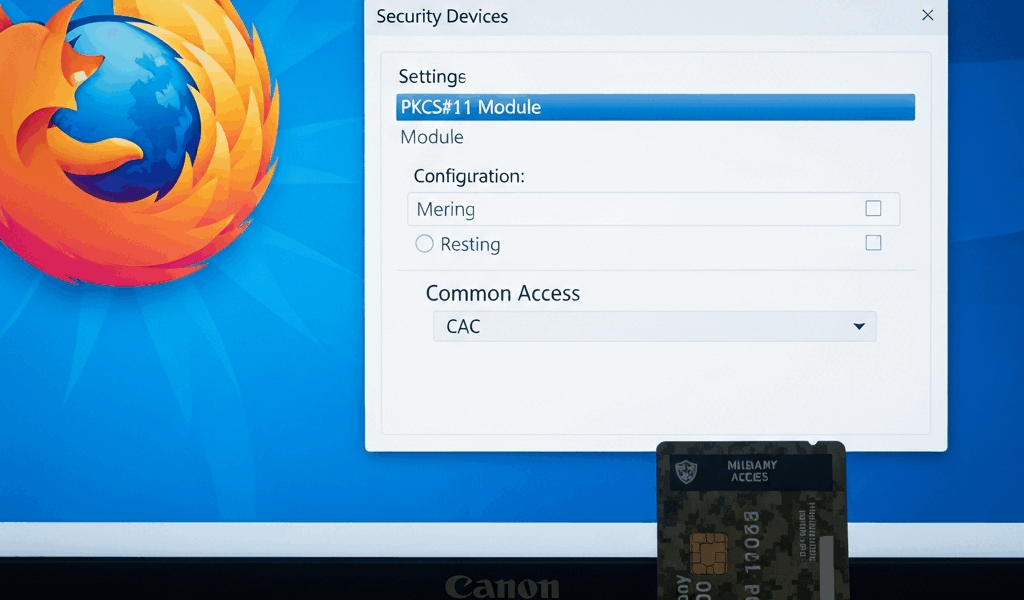
Why Firefox Fails With CAC Cards
CAC card authentication has gotten complicated with all the conflicting advice flying around. I spent three hours troubleshooting a CAC card not working in Firefox before I figured out what was actually going on. It wasn’t the card. It wasn’t the middleware. Firefox just doesn’t play by the same rules as Chrome or Edge — and nobody tells you that upfront.
Here’s the core issue. Chrome, Edge, and Safari all tap into your operating system’s built-in certificate store. Windows has one. macOS has one. Those browsers borrow them freely. Firefox? It maintains its own completely separate certificate store. That architectural stubbornness is exactly why CAC authentication works flawlessly in Chrome but dies silently in Firefox — even when everything else is installed correctly and your card reader light is blinking like it should be.
But what is the actual gap here? In essence, it’s a communication breakdown between three things that should talk to each other. But it’s much more than that. The DoD and military networks rely on Public Key Infrastructure. Your CAC card holds a private key and certificate. The middleware installed on your system can talk to your card. The Windows certificate store knows about DoD root CAs. Firefox knows about neither — and it won’t go looking on its own. That gap between what’s installed and what Firefox can actually access trips up most government users the first time they try this.
So, without further ado, let’s dive in.
Step 1 — Load the PKCS#11 Security Device Module
This is the step that changes everything. Honestly, this single fix resolves about 70 percent of CAC problems in Firefox I’ve seen reported across forums and help desks.
Open Firefox and navigate to Settings > Privacy & Security. Scroll down until you hit the “Security” section. Look for Security Devices and click it.
A dialog box appears. Probably looks empty right now. That’s because Firefox has zero security devices loaded by default — it’s not broken, it’s just willfully ignorant. Click the Load button.
Now you need the exact file path to your PKCS#11 module. This depends entirely on what middleware you’re running:
- OpenSC (common on Linux and some Windows installs): C:\Program Files\OpenSC Project\OpenSC\bin\opensc-pkcs11.dll (Windows) or /usr/lib/opensc-pkcs11.so (Linux)
- DoD CAC Middleware (ActivClient): C:\Program Files\ActivIdentity\ActivClient\acpkcs211.dll (Windows)
- macOS with DoD middleware: /Library/Security/tokend/OpenSC.tokend (older systems) or check /usr/local/lib for .dylib files
- CoolKey (legacy): C:\Program Files\OpenSC Project\CoolKey\bin\coolkeypk11.dll
Type the full path into the “Module filename” field. Give it something recognizable — “OpenSC” or “DoD CAC” works fine. Click OK.
Firefox will try to load the module. Wrong path or missing file gets you an error. Double-check the installation directory of your middleware manually if needed. I’m apparently someone who assumed ActivClient always installs to a clean path, and that assumption cost me forty-five minutes once. Don’t make my mistake — some installations use folder names like “ActivClient 7.2” rather than just “ActivClient”, so dig into Program Files and look before typing anything.
Once the module loads, it appears in your Security Devices list. You should see your CAC reader listed right there. That’s when Firefox actually gains the ability to see your card — not before.
Step 2 — Import DoD Root Certificates Into Firefox
Probably should have mentioned this earlier, honestly. Loading the PKCS#11 module alone isn’t enough. Your CAC certificate chains back to root CAs issued by the Department of Defense — and Firefox’s default certificate store doesn’t include them. You have to import them by hand.
Grab the DoD certificate bundle from the DoD Cyber Exchange at dodcerts.dod.mil. Download the InstallRoot tool or pull the certificate bundle directly. Extract it. You’ll end up with several .crt or .cer files. The critical ones are the DoD root CAs and intermediate CAs — usually labeled something like “DoD Root CA 3” or “DoD Intermediate CA 2”.
In Firefox, go to Settings > Privacy & Security > Certificates > View Certificates. Click the Authorities tab. Click Import. Select your DoD root certificate file. A dialog asks which certificate authorities to trust — check “Trust this CA to identify websites” and “Trust this CA to identify email users” if those prompts appear. Click OK.
Repeat this for each DoD CA certificate. Most setups need at least three: the root CA and two intermediate CAs. Missing even one breaks the chain of trust entirely. That’s what makes this process unforgiving for us government users — there’s no partial credit.
After importing, return to the Authorities tab and search “DoD” in the search box. Your imported CAs should appear. If they don’t, the import failed — check that the .crt files are properly formatted and not corrupted during download.
Step 3 — Check Firefox Security Settings and Compatibility
Firefox has several settings that quietly block CAC authentication even after you’ve loaded the PKCS#11 module and imported every certificate correctly. These are the ones that make you feel like you’re losing your mind.
TLS version mismatch: Some older government systems require TLS 1.2 specifically. Firefox defaults to newer versions and sometimes needs explicit configuration to step back. Go to Settings > Privacy & Security and check what your system’s TLS compatibility actually looks like against the DoD network you’re hitting.
Extensions: Third-party extensions can intercept certificate selection or swallow authentication prompts whole. Disable all of them temporarily — go to about:addons and toggle them off. If CAC suddenly works, an extension was the culprit. Re-enable them one at a time to find the bad actor. I’m apparently someone who runs twelve extensions and never suspects them first. Learn from that.
Firefox ESR compatibility: Many government networks standardize on Firefox ESR — the Extended Support Release. This version handles PKCS#11 differently than standard Firefox. If you’re on standard Firefox, switch to ESR. If you’re already on ESR, verify your middleware version supports that specific ESR number. DoD ActivClient 7.1 doesn’t always play nicely with Firefox ESR 102, for instance. That version mismatch is a known headache.
Enterprise policies: Domain-joined machines locked down by group policy can prevent Firefox from accessing certain system resources altogether. That typically requires IT involvement — you won’t be able to fix it yourself from inside Firefox.
Still Not Working — Advanced Fixes and When to Escalate
Frustrated by none of that working? You’re not alone. Let me walk through what’s left.
Multiple certificates on one CAC: Some CACs store multiple key pairs and certificates. Firefox might grab the wrong one automatically — and silently. When prompted to select a certificate, choose the one explicitly labeled “Digital Signature” or “Authentication”. Not being prompted at all means Firefox doesn’t see multiple certs. Go back to Step 1 and verify the PKCS#11 module actually loaded.
Firefox profile corruption: Cached certificate data and corrupted profile settings cause persistent failures that look completely random. Type about:profiles in the address bar and create a fresh profile. Test CAC authentication there. Works in the new profile? Your old one is corrupted. Migrate bookmarks and settings, then delete the old profile.
Third-party security software: McAfee, Kaspersky, and various endpoint protection tools intercept certificate operations at the system level. Temporarily disable real-time scanning, whitelist Firefox in your antivirus settings, or add your government site to trusted zones. This might be the best option if nothing else has worked, as CAC authentication requires unobstructed certificate handshaking. That is because any interception — even well-intentioned antivirus scanning — breaks the chain mid-handshake.
When it’s not actually your problem: Test your setup against the official DoD CAC test page at militarycac.com. That page working but your agency site failing means the issue lives server-side. The site might not support Firefox at all, or it requires specific certificate validation logic that breaks under Firefox’s PKCS#11 implementation. Contact your agency IT support at that point — you’ve done your part.
While you won’t need to document every click you made, you will need a handful of specific details ready when you call: which PKCS#11 module you loaded, which DoD CAs you imported, which Firefox version you’re running, and whether the DoD test page works or fails. That information cuts IT support resolution time significantly — sometimes in half. Don’t show up empty-handed.




Stay in the loop
Get the latest cac setup.com updates delivered to your inbox.